A habit tracker with a widget that actually gets used
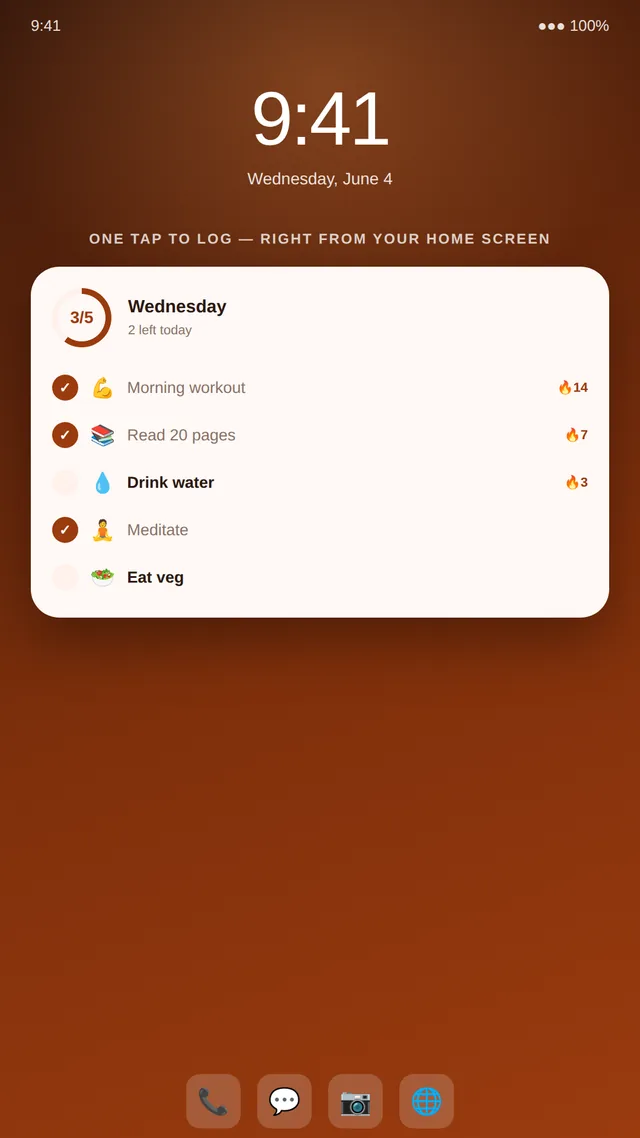
The hardest part of any habit tracker is opening it. Streakly's Android widget removes that step entirely — your habits live on the home screen, one tap from done.
Friction is the enemy of consistency
Every extra step between you and logging a habit is a chance to forget. Open the phone, find the app, wait for it to load, tap the habit — four steps, and any one of them can derail the day. A widget collapses that to one tap on a screen you already look at dozens of times a day. That single change is often the difference between a streak that survives and one that quietly dies.
Your habits, on the home screen
One-tap done
Mark any habit complete directly from the widget. No launch, no loading, no excuse.
Streaks stay visible
Your active streaks sit on the home screen, so the cost of breaking the chain is always in view.
Today at a glance
See what's done and what's left for the day every time you unlock your phone.
Add the widget in three steps
Takes under a minute — then you rarely open the app again.
Long-press your home screen
Tap “Widgets”, then find Streakly in the list of available widgets.
Drop the widget where you'll see it
Place it near your most-used apps so today's habits are impossible to miss.
Tap a habit to complete it
The check fills, the streak ticks up, and the widget refreshes — all without opening Streakly.
Widget questions
Does Streakly have a home-screen widget?
Yes. Streakly includes an Android home-screen widget that lists today's habits and lets you mark them done in a single tap, without opening the app.
Can I complete habits without opening the app?
Yes — that's the point of the widget. Tap a habit on the widget and it's logged instantly, the streak updates, and the widget refreshes in place.
How do I add the Streakly widget?
Long-press an empty area of your Android home screen, choose Widgets, find Streakly, and drag the widget into place. You can resize it to show more or fewer habits.
Does the widget show my streaks?
Yes. The widget surfaces today's habits and their streak status, so your progress is visible every time you glance at your phone.
Is the widget free?
Yes. The home-screen widget is available on the free plan along with streak tracking and stats. Premium adds unlimited habits, cloud sync, and CSV export.
Keep reading
Put your habits on the home screen
Free to download. The widget is included.
Download on Google PlayMade by an indie developer — no ads, no tracking, your data stays yours.